.jpeg)
TLDR
There is a gap that almost every QA team lives with, and rarely talks about directly.
The gap between requirements and test coverage
There is a gap that almost every QA team lives with, and rarely talks about directly.
Requirements exist in one tool. Test cases exist in another.
And the question “do our tests actually cover what was specified?” often gets answered informally, in a standup, a release review, or simply by gut feeling, rather than with evidence.
That gap matters most when it's too late: after a bug reaches production, or when a compliance auditor asks for traceability between your specifications and your test suite.
This article shows how we close that gap using Jira MCP and Thunders MCP inside Claude, automatically, on demand, and with an auditable output.
Why manual coverage reviews break down
When a feature ticket lands in QA, the standard process is roughly: read the acceptance criteria in Jira, open the test case in your test management tool, and mentally check off which criteria seem covered.
That works when a ticket has three criteria and two test steps. It breaks down when you have six criteria across file handling, processing, output quality, UX, and security, and a test case with eight steps that don't map one-to-one.
You end up with a subjective call, documented nowhere, made under time pressure.
The deeper issue is that requirements and test cases are created independently, often in different tools, by different people, and at different moments in the development cycle. There is no built-in mechanism to keep them aligned. You have to align them manually, every time.
What changes with MCP
MCP (Model Context Protocol) allows AI assistants to connect directly to external tools and access their data.
With Jira MCP and Thunders MCP connected, Claude can retrieve a Jira ticket and a Thunders test case within the same session and examine them together, without any export, copy-paste, or switching between tools.
Claude can read the acceptance criteria from Jira, review the test steps from Thunders, and compare them directly.
Instead of manually checking both systems and mapping requirements to test steps, the analysis can be generated automatically from the live data in both tools.
While this demo uses Claude, the same MCP workflow works with any MCP-compatible client, including ChatGPT, Devin, and others.
Before using this workflow, make sure Thunders MCP is connected to Claude. You can follow this quick setup guide.
Demo: Checking test coverage for Smallpdf’s PDF-to-Word feature
To make this concrete, here is the exact flow we ran.
In Jira, we created a feature ticket (KAN-10) for the PDF to Word conversion feature on Smallpdf. The ticket contains a user story and six structured acceptance criteria covering file upload behaviour, conversion processing, output quality, download and export options, UX requirements, and a security requirement around file deletion.
In Thunders, we used Thunders AI to generate a test case titled “PDF to Word Conversion from a natural language scenario. The generated steps validate the happy path: upload image-compressed.pdf, wait for the conversion to finish, confirm that a Download button appears, click it, and verify that a .docx download link is presented.
Then we ran this prompt inside Claude:
🧠 Prompt (copy/paste) :
Using the Jira MCP and Thunders MCP, fetch Jira ticket KAN-10 and its corresponding Thunders test case.
Compare the acceptance criteria against the test steps.
For each criterion, mark it as Covered, Partially Covered, or Not Covered, and explain why.
Produce a Word document with a coverage summary, a coverage table, and recommendations for any gaps.
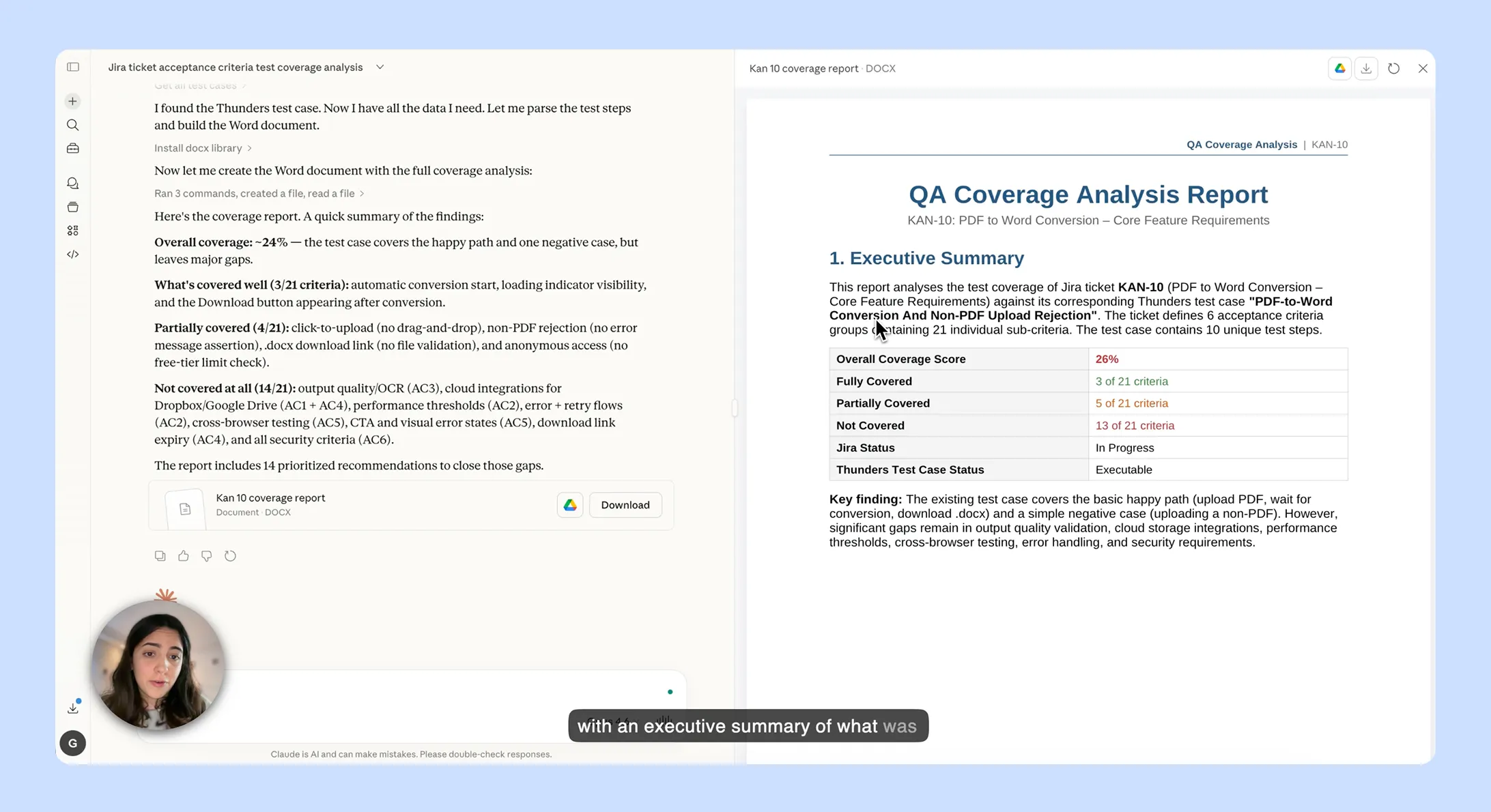
Claude calls both MCP servers, fetches the live data, and runs the analysis.
The result is a structured Word document with a coverage matrix, a gap analysis, and new test steps written in Thunders format, ready to be added directly.
Why this matters beyond saving time
The obvious benefit is speed. A coverage review that used to take 20–30 minutes of reading and cross-referencing now takes seconds.
But the more important benefit is consistency and auditability. The report is generated from the live state of both systems, at a specific point in time, with explicit references to the source data.
If requirements change in Jira, you re-run the prompt and get a new report. If test steps are added in Thunders, same thing. The output is always current, always traceable.
For teams working in regulated industries or running internal compliance reviews, that traceability is the difference between "we think our tests cover this" and "here is the evidence."
Reusable prompt for coverage analysis
To run the same coverage analysis on your own tickets, use the prompt template below.
🧠 Prompt (copy/paste)
Using the Jira MCP and Thunders MCP, fetch Jira ticket [TICKET-KEY] and its corresponding Thunders test case.
Compare the acceptance criteria against the test steps.
For each criterion, mark it as Covered, Partially Covered, or Not Covered, and explain why.
Produce a Word document with a coverage summary, a coverage table, and recommendations for any gaps.
Replace [TICKET-KEY] with your Jira issue key and run the prompt.
If you want the recommendations written as Thunders-ready test steps, add that.
If you need an audit trail with timestamps and source IDs for a compliance report, add that too.
The base prompt works as-is for a day-to-day coverage check.
Where this goes next
This flow works for any feature ticket with structured acceptance criteria, not just PDF tools. The pattern is the same: requirements in Jira, test cases in Thunders, Claude as the bridge.
The next step is to run this as part of the Definition of Done. Before a ticket moves to release, a coverage report is generated and attached.
Not as a gate, but as a signal: a fast, automatic signal that tells you exactly where the gaps are while there's still time to close them.