
AI testing personas: one test case, every expert.
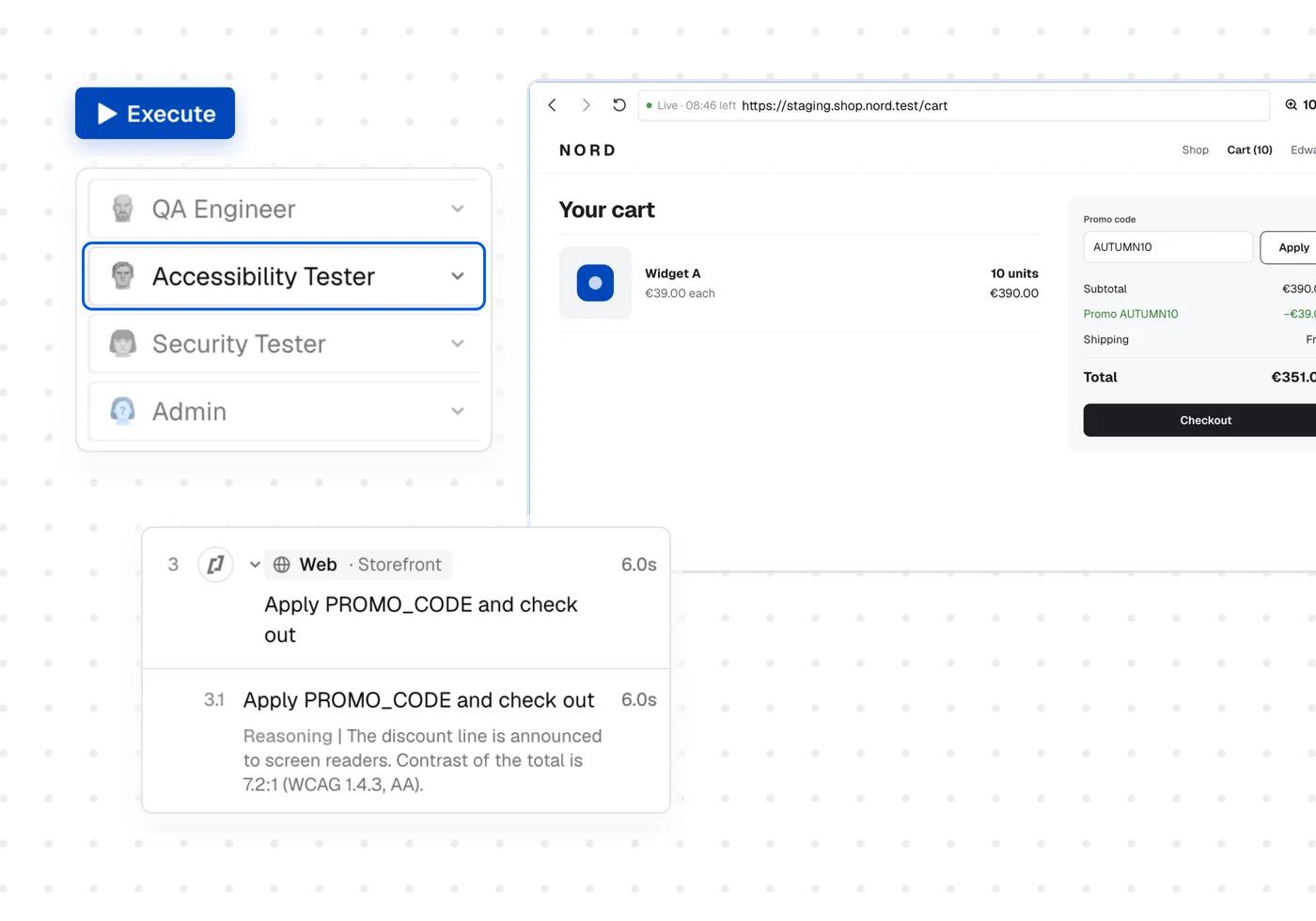
A persona is a specialist AI tester. When you run one of your test cases, you choose which persona runs it, and you get its own expert report: accessibility, security, or any role you define. Write the test once. Test it from every angle.












Why teams rely on Thunders’ AI Personas

A tester with real expertise, not a script
The QA Engineer runs your steps exactly as written. Every other persona runs the same flow and also applies its own expertise, without being asked, the way a human specialist would: it notices what looks wrong or feels slow, not just whether a step passed. Reuse the tests you already have and switch persona in one click, with no second suite to maintain.

Reports you can act on, not generic opinions
Each persona returns real output. The Accessibility Tester produces a WCAG A, AA and AAA report against RGAA and international standards. The Security Tester maps its findings to OWASP. Personas draw on live standards and tools, not a single prompt. Thunders keeps that expertise current, so when a standard or regulation changes, the persona is updated for you.

Coverage across the whole journey
Most point tools check one page at a time. A persona follows your full user flow and catches what only appears between steps: focus lost after a click, roles that conflict across views, structure that breaks mid-journey.

Build a persona for your own context
Define any role or expertise. An admin that signs in with admin access and tests behind the login. A banking reviewer that follows your internal guidelines. A legal checker for the regulations you answer to. Your domain knowledge becomes a tester you reuse on every release.

Enforce specialist checks in CI/CD
Add a persona to your CI/CD pipeline. Fail the build on an accessibility or security regression, not only a functional one. The checks that usually slip to the end of a cycle run on every commit instead.

Give your team expert superpowers
Anyone on the team describes what to test in plain language, and the persona brings the expertise. It gives your team expert superpowers: test like an accessibility or security specialist, faster, and automate it, so coverage grows on every release.
Think like a user. Test like one.
Meet the personas
Personas are specialist testers in your workspace. Start with the QA Engineer, then run the same tests through any specialist you need.




QA Engineer
What it does
Runs your steps and confirms the product works.
What you get back
Functional bugs and regressions, flagged step by step.
What it does
Runs the same journey against WCAG A, AA, AAA and RGAA. Choose the standard you need.
What you get back
An accessibility report ready for VPAT, procurement or compliance sign-off.
Security Tester
What it does
Runs your critical flows with a hacker mindset: injection, exposure, misconfiguration.
What you get back
Findings mapped to OWASP, located by page and component.
Custom persona
What it does
Any role, any expertise, any access level. You describe what it should know and check.
What you get back
A tester tuned to your domain, reusable on every release.
The persona library keeps growing, with UX and performance reviewers on the way.
Use cases
Most teams run an accessibility or security audit once a year, if that. Add the Accessibility and Security personas to CI/CD and the build fails the moment a commit introduces a WCAG violation or a vulnerability. The check that once happened yearly now runs on every release.

Create a persona per role: admin, manager, free user, paying user. Each signs in with its own access and runs the same journeys. Role-based coverage without duplicating tests or managing credentials by hand.

You already have tests for your core journeys. Run them again with the Accessibility Tester and get a WCAG and RGAA report, without rebuilding a single flow. Export the results mapped to success criteria for VPAT and procurement.

Product managers, designers and QA describe what to test in plain language, and the persona supplies the expertise. One platform in place of a stack of separate accessibility and security tools.

This is our QA of the future. From the very first tests, Thunders caught real bugs in our interface, bugs that had slipped through all our standard quality processes.
Wassim Jouini
CTO
@
LegalPlace

Discover Thunders' features
Frequently Asked Questions
What is a persona in Thunders?
A persona is a specialist AI tester. It runs your existing test cases through one lens, functional, accessibility, security, or a role you define, and returns a report for that discipline.
How is a persona different from a normal test?
A normal test checks one thing: does the flow work. A persona reuses that same flow and applies a different expertise, so one test case produces several kinds of coverage.
Do I have to rewrite my tests to change persona?
No. Pick a different persona and run the same test case. There is nothing to rewrite.
Which personas are available?
The QA Engineer runs by default. The Accessibility Tester (configurable, with WCAG and RGAA reports) and Security Tester are available in the persona list, and you can build your own. The library continues to expand.
Can I build a persona for my own domain?
Yes. Define the role, the expertise and the access level. Examples include an admin persona that tests behind the login, a banking reviewer that follows your guidelines, or a legal checker for your regulations.
Can personas run in CI/CD?
Yes. Add a persona to your pipeline and fail the build on a regression in that discipline, the same way you gate on functional tests.
How is this different from a separate accessibility or security tool?
Point tools need their own flows, built and maintained apart from your functional suite. Personas reuse the tests you already have and keep every discipline in one platform.
Ready to ship faster with smarter testing?
