
Squash TM integration: AI Test Agents that run your Squash tests
Keep Squash TM as your reference. Thunders AI imports your Squash test cases, AI Test Agents generate, execute and analyze them on Web, Mobile, API, Desktop and SAP, and every run is recorded as an execution in the Squash iteration you choose. Before, a test case ran once per campaign, by hand. Now it runs after every release, by itself.













What changes with Thunders for Squash TM teams
The Thunders Squash TM integration gives a Squash team AI execution without changing where the tests live. With Thunders AI, you ask in natural language to read a Squash test case, create one, or sync a run, and the execution lands in your Squash iteration.
Recommended for
QA teams in French public companies and large groups where Squash TM is the reference for test cases, campaigns and iterations
Teams that want AI execution on every release without moving their test base out of Squash TM
Squash TM users who already test Web, Mobile, API, Desktop or SAP and want one tool to run them all
Teams that report in Squash TM and track defects in Jira
Why choose Thunders for Squash TM test automation
Import Squash TM test cases without rewriting them
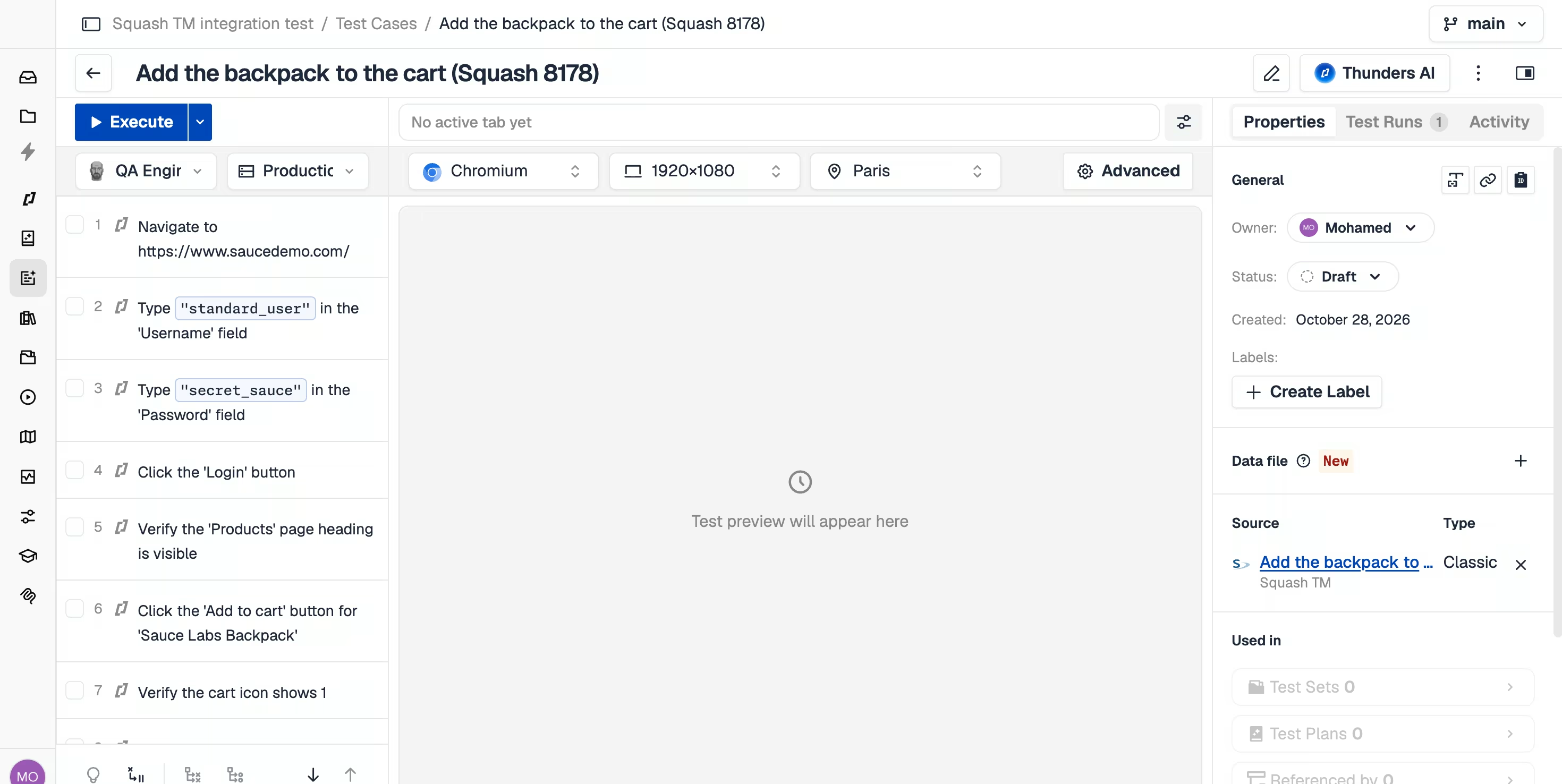
Tell Thunders AI which Squash test case to read, and it turns the prerequisite, the description and every step into a Thunders Test Case written in natural language. Classic, Gherkin, BDD and Exploratory test cases all import and keep a link to their source: reference, name, type and a link back to Squash. Describing a test in natural language and recording it in the browser still work; a Squash import is one more way in.
Run Squash tests with AI Test Agents on Web, Mobile, API, Desktop and SAP
An imported Squash test is a normal Thunders Test Case. Run it with any Persona on Web, Mobile, API, Desktop or SAP, in the browser, on a schedule, or from your CI/CD pipeline. When the UI changes, self-healing repairs the step and tells you what it healed and why. One team covers the flows that used to need six, with Squash TM as the single list of what gets tested.
Sync every result to a Squash TM iteration, automatically
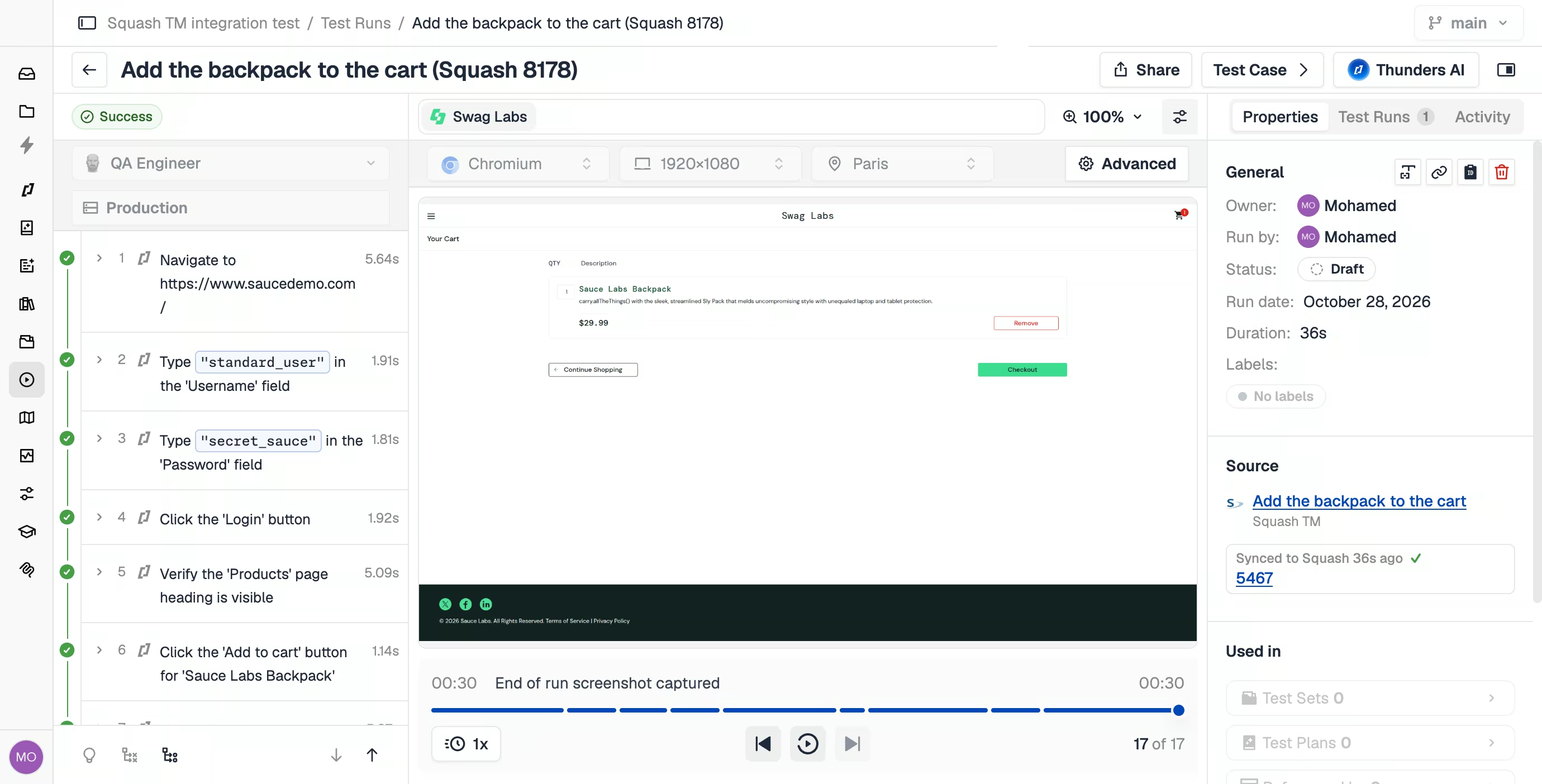
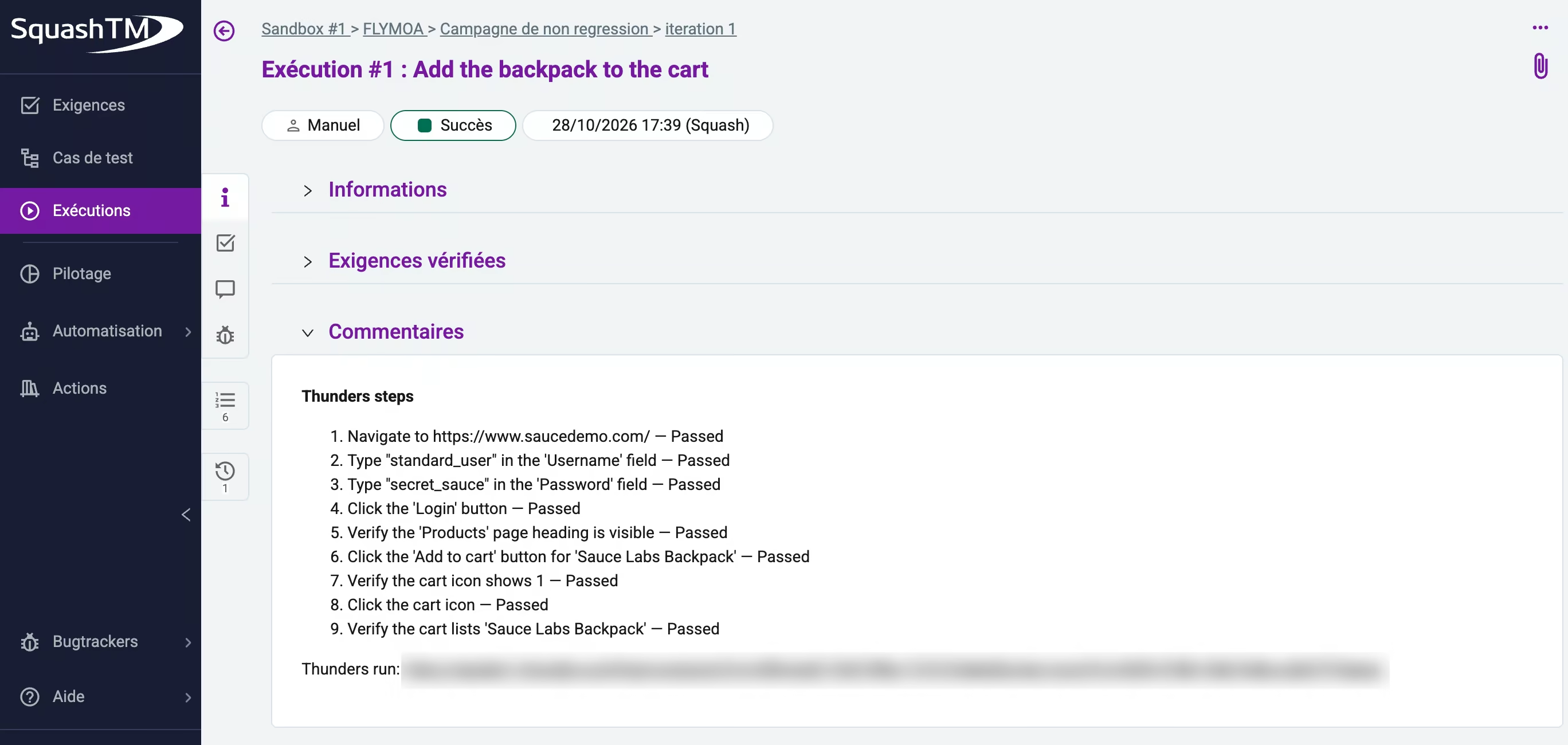
After a run, Thunders creates a new execution of the linked test case in the campaign and iteration you choose. A passed run is recorded as Passed, a failed run as Failed, an interrupted run as Blocked. The execution comment lists every Thunders step with its result, and for a failed step, what Thunders found: the type and severity of the issue, the element, the expected and actual results, plus a link to the run in Thunders. Squash keeps the record, Thunders keeps the evidence: steps, screenshots and history, one click from the execution in Test Management & Collaboration. Turn on “Sync after each run” and you never click Sync again.
Create Squash TM test cases from Thunders AI, and keep them current
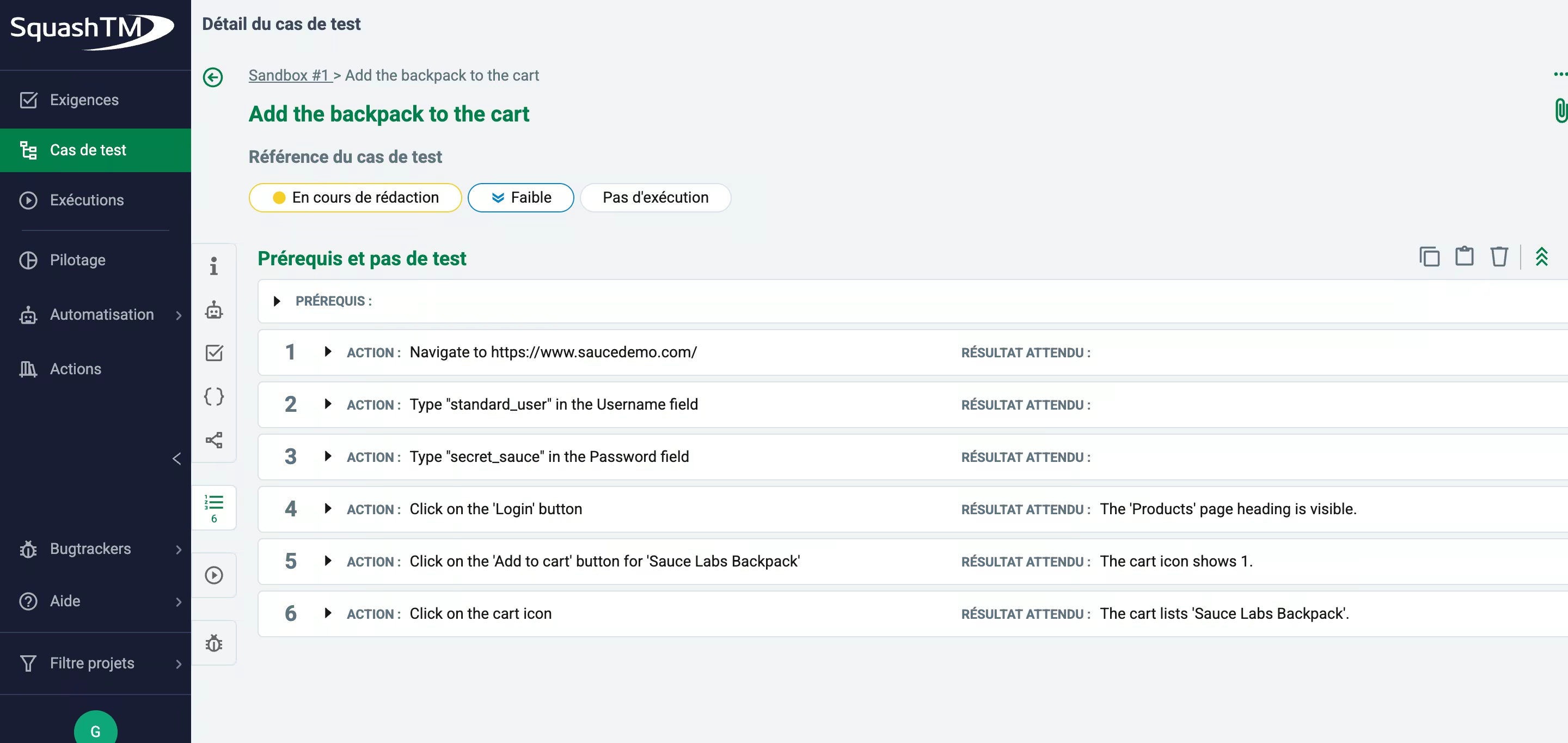
Ask Thunders AI to create a Classic test case in a Squash project and it writes each step as an action with its expected result, then gives you the ID and the name. Ask it from a Thunders Test Case and the two are linked, so the next run syncs. You can also ask it to read a Squash requirement, with the test cases that already verify it, and generate a Thunders test that covers it. An existing Squash test case is updated only when you ask for it. And when a run fails, your defect goes where it already lives: Thunders integrates with Jira too.
Discover Thunders' features
Frequently Asked Questions
What is Squash TM?
Squash TM is an open source test management tool published by Henix, used to write test cases, link them to requirements, plan campaigns and iterations, and record executions. It is the reference test management tool in many French public companies and large French groups, often alongside Jira for defects.
What does the Thunders Squash TM integration do?
The Thunders Squash TM integration connects Thunders AI to your Squash TM instance so that Squash test cases run as AI-executed tests and every run is recorded in Squash. Thunders AI imports Squash test cases and requirements, creates Classic test cases in Squash, AI Test Agents run the tests on Web, Mobile, API, Desktop and SAP, and each run becomes a new execution in the Squash iteration you choose, with its status and a step-by-step comment.
Which versions of Squash TM work with Thunders?
Thunders works with Squash TM 7.1 or later, through the Squash REST API and a personal API token. Your Squash administrator sets the REST API JWT secret once so that users can create tokens.
Does Thunders work with a self-hosted Squash TM?
Yes. Thunders connects to a self-hosted Squash TM through its REST API. For an instance on a private network, your organization’s relay carries the connection; our team sets it up with you. Contact [email protected] to get started.
How does the Squash TM result sync work?
After each run, Thunders creates a new execution of the linked test case in the Squash campaign and iteration you choose, adds the test case to the Execution plan if needed, and sets the status: Passed, Failed, or Blocked for an interrupted run. The comment lists every Thunders step and its result, with a link to the run. Sync by hand from the run report, or turn on “Sync after each run” with a default campaign and iteration.
Can I send the runs of a Schedule to their own Squash iteration?
Yes. When auto-sync is on, the Schedule dialog shows a Squash iteration field. Runs of that Schedule are recorded there and other runs use the default iteration of the connector. See how to schedule a Test Set.
Where do I see the screenshots and step evidence of a synced run?
In the Thunders run, one click from the execution comment in Squash. Thunders records the execution status in Squash and keeps the full evidence, screenshots, step timings and history in the run, so Squash stays readable and the proof stays complete.
Why does a Thunders execution show as “Manual” in Squash TM?
Squash TM labels every execution created through its REST API as Manual, and an execution started by Squash Orchestrator as Automated. A run synced from Thunders therefore shows as Manual; a run launched from Squash through the Thunders add-on for Squash Orchestrator shows as Automated. The status, the comment and the link to the Thunders run are the same either way.
What is the difference between the Thunders Xray and Squash TM integrations?
Both let Thunders AI import tests, create tests and sync results, and each sync is adapted to the tool. Xray Cloud and Data Center receive a status for each step, screenshots and timestamps. Squash TM receives the execution status with the full step detail in the comment, which is how Squash teams read results. See the Xray integration.
Can Squash TM start a Thunders run?
Yes. With the Thunders add-on for Squash Orchestrator, a tester starts the automated execution from the Squash iteration and Squash receives the status and the report. Runs also start from Thunders, from a Schedule or from your CI/CD pipeline, and the results land in Squash TM either way.
Does the Squash TM integration use MCP?
Yes. Thunders AI connects to Squash TM through MCP, on top of the Squash REST API, so you connect with a URL and a personal API token and nothing is installed on the Squash server. It appears next to Xray, Jira, Linear and your custom MCP servers in the Thunders AI source selector.
Who can see my Squash TM data in Thunders?
Only you, through your own token. Squash TM connections are personal and scoped to a project: each user connects with their own API token, stored encrypted, and Thunders sees what that token can see in Squash. Thunders is ISO 27001 and SOC 2 certified and runs as SaaS, Hybrid or Self-hosted. Details are in the Trust Center.
Does the Squash TM integration cover Web, Mobile, API, Desktop and SAP tests?
Yes. The connection is made at project level, so import and result sync work the same for every App you test in that project.
Is Thunders a replacement for Squash TM?
Thunders complements Squash TM: Thunders is the AI test automation platform that runs the tests, and Squash TM stays the test management reference. Teams keep their campaigns, iterations and reporting in Squash and add AI Test Agents that generate, execute and analyze the tests.
Ready to ship faster with smarter testing?
